
Spring Boot Simplifies Java Servlet Management
Before we talk about Spring Boot, first we need to understand “Servlet” and “Servlet container”. They provide a foundation for building a web application. A servlet is a Java class that handles client requests, processes them, and returns a response. And servlet containers are the ones that manage the servlet.
`java
@WebServlet("/demoServlet") //demoServlet is protected and mapped with URL pattern "/demoServlet"

{
doGet()
doPost()
}.
`
`xml
<servlet-mapping>
<servlet-name> DispatcherServlet </servlet-name>
<url-pattern> / </url-pattern>
</servlet-mapping>

<servlet>
<servlet-name> DispatcherServlet </servlet-name>
<servlet-class> org.springframework.web.servlet.DispatcherServlet </servlet-class>
</servlet>
`
Spring Frame work with example
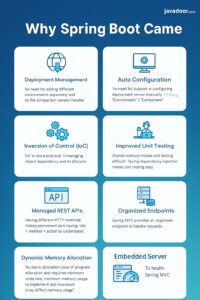
(1) Removal of WebXML
– This WebXML over the times became too big and becomes very difficult to manage and understand .
→ Spring Frame work introduced Annotation based configuration.
(2) Inversion of control (IoC)
– IoC is more flexible way to manage object dependencies and its lifecycle.
1. Unit testing is much harder
– As the object creation depends on servlet, mocking is not easy. Which makes unit testing process harder .
– Spring dependency injection facility makes the unit testing very easy.
2. Difficult to manage rest API
– Having different http methods request parameters, path making, code little difficult to understand .
– Spring MVC provides an organized approach to handle the request.
– The dynamic memory requires no static allocation in case of program allocation.
– The grid requires no static allocation in case of program and dynamic memory allocation is required at run time.
– The requirement for the dynamic memory program with only main framework with no memory allocation.
– Implement with minimum code size.
– Implement with minimum memory usage.
– Implement with maximum memory usage (may differ).
– Memory analysis part:
– Coding
– Memory
– Security.
Spring Boot Some Changes
1. Deployment Management – no need for adding different environments separately and no file comparison version handler
2. Auto Configuration – No need for support in configuring deployment server manually – “Environment” / “Component”
3. Embedded Server
4. To Health Spring MVC
Diagram:
– Entity
– Entity
– Entity
↓
– Common
– Service
– Repo
Notes:
– entity common mapped (common repo)
– DTO DAO annotated object
– Many
– validatory – compare – test
– package – many – manual – compare