
Spring Boot JPA – Part 1
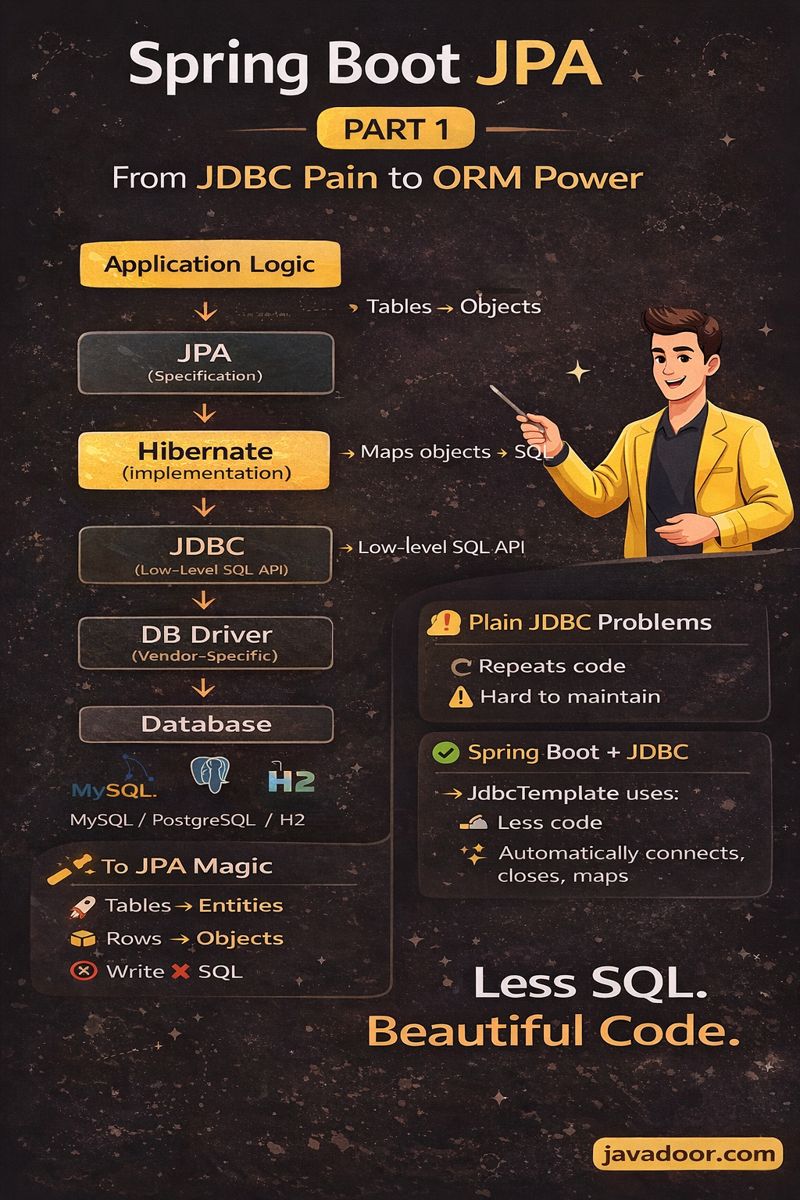
From JDBC Pain to ORM Power
When we start working with databases in Java, the first thing we usually touch is JDBC. It works… but very soon, it starts to feel heavy, repetitive, and hard to maintain.
That’s exactly why JPA + Hibernate exists.
Let’s understand this step by step.
The Big Picture: How JPA Works
Think of your application like a chain:
Application → JPA → Hibernate → JDBC → Database Driver → Database
Here’s what each layer does:
- JPA is just a specification. It tells how ORM should behave.
- Hibernate is the implementation of JPA.
- JDBC is the low-level API that actually talks to the database.
- Database Driver is vendor-specific (MySQL, PostgreSQL, H2, etc.).
- Relational Database stores your data.
So when you write JPA code, internally Hibernate uses JDBC and the DB driver to execute SQL.
Quick Recall: What is JDBC?
JDBC provides interfaces to:
- Connect to a database
- Execute SQL queries
- Read results
But JDBC does not implement anything.
The real work is done by database drivers like:
- MySQL →
com.mysql.cj.jdbc.Driver - PostgreSQL →
org.postgresql.Driver - H2 →
org.h2.Driver
Why Plain JDBC is Painful
In plain JDBC, for every query you must:
- Load the driver
- Create a connection
- Create a statement
- Execute the query
- Handle SQL exceptions
- Close resources manually
- Manage connection pool
This leads to boilerplate code, bugs, and memory leaks.
Spring Boot + JDBC = JdbcTemplate
Spring Boot solves most of this using JdbcTemplate.
You just write:
jdbcTemplate.query("select * from users", rowMapper);
And Spring automatically:
- Opens the connection
- Executes the query
- Maps the result
- Handles exceptions
- Closes the connection
No more messy code.
Setting up JDBC in Spring Boot
Dependencies
<dependency>
    <groupId>org.springframework.boot</groupId>
    <artifactId>spring-boot-starter-jdbc</artifactId>
</dependency>

<dependency>
    <groupId>com.h2database</groupId>
    <artifactId>h2</artifactId>
    <scope>runtime</scope>
</dependency>
application.properties
spring.datasource.url=jdbc:h2:mem:userdb
spring.datasource.driver-class-name=org.h2.Driver
spring.datasource.username=sa
spring.datasource.password=
spring.h2.console.enabled=true
Connection Pooling (HikariCP)
Spring Boot uses HikariCP by default.
- Minimum connections → 5
- Maximum connections → 10
You can configure:
spring.datasource.hikari.maximum-pool-size=10
spring.datasource.hikari.minimum-idle=5
Custom DataSource (Optional)
@Bean
public DataSource dataSource() {
    HikariDataSource ds = new HikariDataSource();
    ds.setDriverClassName("org.h2.Driver");
    ds.setJdbcUrl("jdbc:h2:mem:userdb");
    ds.setUsername("sa");
    ds.setPassword("");
    return ds;
}
Most Used JdbcTemplate Methods
| Method | Purpose |
|---|---|
update() |
Insert / Update / Delete |
query() |
Get multiple rows |
queryForObject() |
Get single value |
queryForList() |
Get list of values |
Why We Still Need JPA?
JdbcTemplate is powerful, but you still write SQL.
JPA removes even that.
With JPA:
- Tables → Entities
- Rows → Objects
- SQL → Method calls
That’s where Hibernate + JPA becomes magical.
Final Thought
JDBC teaches you how databases work.
Spring JDBC makes it clean.
JPA makes it beautiful and scalable.
In the next part, we’ll move from JdbcTemplate → JPA Entities → Repositories 🚀