
Role-Based Authorization in Spring Boot using @PreAuthorize and @PostAuthorize
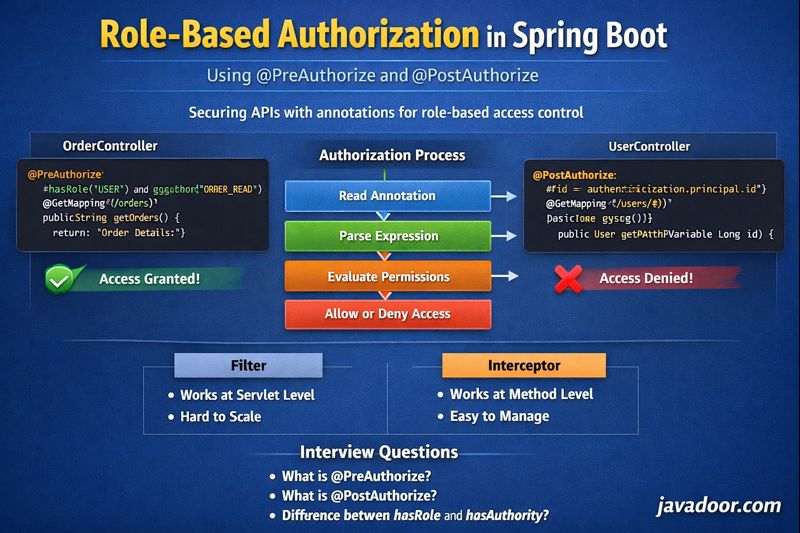
In modern Spring Boot applications, security is not just about authentication (who you are) but also about authorization (what you can do).
Earlier, we handled authorization at the Security Filter layer. That approach works fine for small systems, but in large-scale applications with hundreds of APIs, managing all roles and permissions in filters becomes complex and hard to maintain.
That’s where Annotation-based Role Authorization comes into the picture.
Why Annotation-Based Authorization?
Instead of controlling access in filters, we can declare security rules directly on controller methods using annotations like:
@PreAuthorize@PostAuthorize
This makes the system:
- More readable
- More maintainable
- More scalable
Enabling Method-Level Security
Before using these annotations, we must enable them in our Security Configuration:
@EnableMethodSecurity
public class SecurityConfig {
}
⚠️ Without this, @PreAuthorize and @PostAuthorize will be ignored.
Creating Sample Controllers
Let’s assume we have two controllers:
OrderControllerSalesController
Each controller exposes APIs like:
/orders/sales
We also create users dynamically with roles and authorities.
Example user:
Username: user1
Roles: ROLE_USER
Authorities: ORDER_READ
This user:
- Can access Order APIs
- Cannot access Sales APIs
Using @PreAuthorize
Example
@PreAuthorize("hasRole('USER') and hasAuthority('ORDER_READ')")
@GetMapping("/orders")
public String fetchOrders() {
    return "Order Details";
}
This means:
- User must have role
ROLE_USER - And must have authority
ORDER_READ
If both conditions pass → API executes
Else → 403 Forbidden
Using @PostAuthorize
@PostAuthorize runs after method execution but before returning the response.
Example
@PostAuthorize("returnObject.id == authentication.principal.id")
@GetMapping("/users/{id}")
public User fetchUserDetails(@PathVariable Long id) {
    return userService.fetchUserDetails(id);
}
Here:
- API executes first
- Then Spring checks if returned user’s ID matches logged-in user
- If not → response is blocked
Difference Between hasRole and hasAuthority
Spring treats both similarly, with one key difference:
| Method | Behavior |
|---|---|
hasRole("USER") |
Internally checks ROLE_USER |
hasAuthority("ORDER_READ") |
Checks exact value |
So:
hasRole("USER")  → ROLE_USER
hasAuthority("USER") → USER
This logic is implemented in SecurityExpressionRoot.java.
How Does Spring Enforce This Internally?
This works using Interceptors, not Filters.
For @PreAuthorize
Spring uses:
AuthorizationManagerBeforeMethodInterceptor
For @PostAuthorize
Spring uses:
AuthorizationManagerAfterMethodInterceptor
These interceptors run before or after method execution.
High-Level Internal Flow
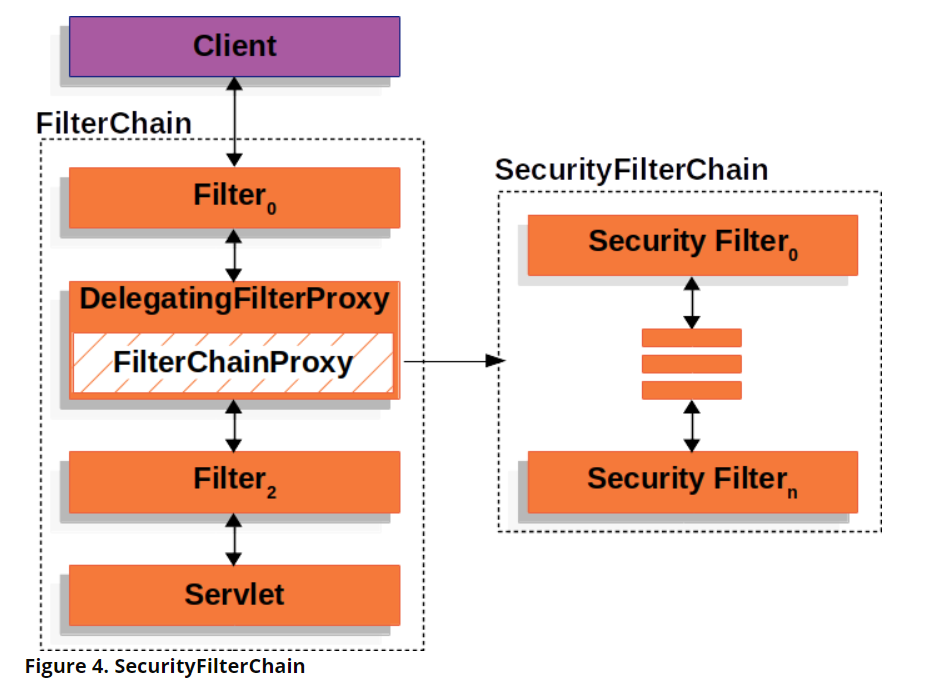


- Reads expression from annotation
@PreAuthorize("hasRole('USER') and hasAuthority('ORDER_READ')") - Parses using:
SpelExpressionParser - Converts expression into:
AST (Abstract Syntax Tree) - Resolves:
- authentication object
- roles
- authorities
- Evaluates result:
- If
true→ method executes - If
false→ access denied
- If
SpEL (Spring Expression Language)
@PreAuthorize and @PostAuthorize both use SpEL.
Logical Operators
| Operator | Meaning | Example |
|---|---|---|
and |
Logical AND | hasRole('ADMIN') and hasAuthority('READ') |
or |
Logical OR | hasRole('ADMIN') or hasRole('USER') |
not |
Logical NOT | not hasRole('ADMIN') |
! |
Logical NOT | !hasAuthority('DELETE') |
Relational Operators
| Operator | Meaning | Example |
|---|---|---|
== |
Equal | #value == 15 |
!= |
Not equal | #value != 15 |
< |
Less than | #value < 100 |
> |
Greater than | #value > 100 |
<= |
Less than or equal | #value <= 15 |
>= |
Greater than or equal | #value >= 90 |
Real-Time Use Case Example
Scenario
Two users:
a_user→ id = 101b_user→ id = 102
API:
@PostAuthorize("#id == authentication.principal.id")
@GetMapping("/users/{id}")
public User fetchUser(@PathVariable Long id) {
    return userService.fetchUser(id);
}
Case 1:
b_user calls /users/101
- Method returns user 101
- PostAuthorize checks:
101 == 102 → false - ❌ Access denied
Case 2:
a_user calls /users/101
- Method returns user 101
- PostAuthorize checks:
101 == 101 → true - ✅ Response sent
Filters vs Interceptors (Quick Difference)
| Filters | Interceptors |
|---|---|
| Works at servlet layer | Works at Spring method level |
| Executes before controller | Executes around method |
| Good for authentication | Perfect for authorization |
| Hard to scale | Highly scalable |
Why This Approach Is Best for Large Systems?
In enterprise applications:
- 100s of APIs
- 1000s of permissions
Managing this in filters becomes nightmare.
With annotations:
- Each API declares its own security
- Business logic and security stay together
- Easy auditing and maintenance
Interview Questions & Answers
Q1. What is @PreAuthorize?
Answer:
It performs authorization before method execution using SpEL expressions.
Q2. What is @PostAuthorize?
Answer:
It performs authorization after method execution but before returning response.
Q3. What is SpEL?
Answer:
Spring Expression Language used to write dynamic authorization rules.
Q4. Difference between hasRole and hasAuthority?
Answer:
hasRole automatically adds ROLE_ prefix, hasAuthority does not.
Q5. Which class intercepts @PreAuthorize?
Answer:
AuthorizationManagerBeforeMethodInterceptor
Q6. Which class intercepts @PostAuthorize?
Answer:
AuthorizationManagerAfterMethodInterceptor
Q7. Why not use only Filters?
Answer:
Filters are hard to manage in large systems and cannot inspect method return values.
Final Thoughts
Annotation-based authorization is:
- Cleaner
- More expressive
- More powerful
- Enterprise-ready
If you’re building microservices or large Spring Boot systems, this is the industry standard way to handle authorization.