
Project Setup & Layered Architecture
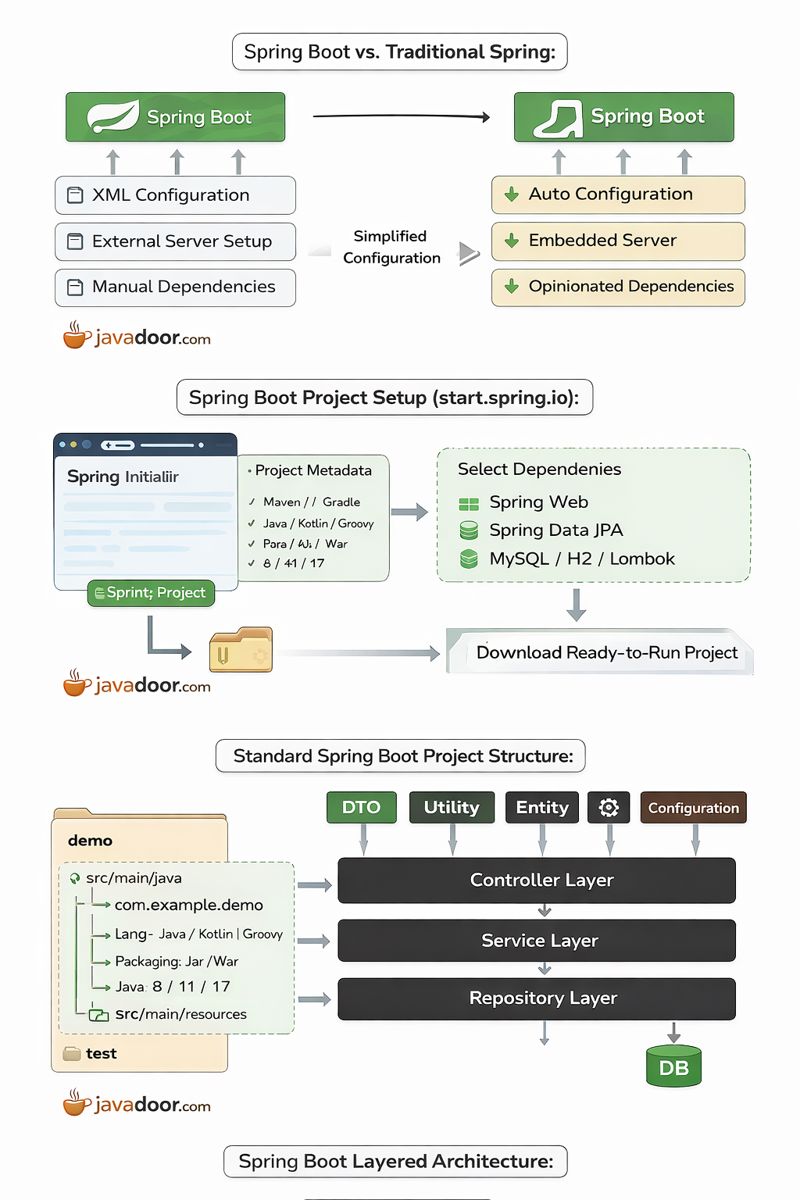
📌 1. Introduction to Spring Boot
Spring Boot is a framework built on top of Spring Framework that simplifies application development, configuration, and deployment.
🔑 Key Objectives of Spring Boot
- Reduce boilerplate configuration
- Enable rapid application development
- Provide production-ready defaults
- Simplify dependency management
🔥 Why Spring Boot?
| Traditional Spring | Spring Boot |
|---|---|
| XML-heavy config | Auto Configuration |
| External server setup | Embedded Tomcat |
| Manual dependency versions | Starter dependencies |
✅ Quick Summary
- Spring Boot is an opinionated framework
- Focuses on convention over configuration
- Ideal for microservices & REST APIs
❓ Interview / Exam Questions
- What problems does Spring Boot solve?
- Difference between Spring and Spring Boot?
- What is opinionated default in Spring Boot?
📌 2. Setting Up a Spring Boot Project (Using Spring Initializr)
Spring Boot projects are commonly created using Spring Initializr.
🌐 Tool Used
- Website: start.spring.io
🔧 Project Setup Options (Explained)
| Option | Purpose |
|---|---|
| Project | Maven / Gradle |
| Language | Java |
| Spring Boot Version | Stable recommended |
| Group | Base package (e.g., com.example) |
| Artifact | Project name |
| Packaging | Jar / War |
| Java Version | 8 / 11 / 17 |
📦 Dependency Selection
- Spring Web → REST APIs, MVC
- Spring Data JPA → ORM & DB access
- H2 / MySQL / PostgreSQL → Database
- Lombok → Reduce boilerplate code
✅ Quick Summary
- Spring Initializr generates a ready-to-run project
- Maven manages dependencies automatically
- Embedded server eliminates manual setup
❓ Interview / Exam Questions
- What is Spring Initializr?
- What is the role of Maven in Spring Boot?
- Difference between Jar and War packaging?
📌 3. Spring Boot Project Structure
Once generated, the project follows a standard directory structure.
📁 Default Structure
src/main/java
 └── com.example.demo
     └── DemoApplication.java

src/main/resources
 ├── application.properties
 └── static / templates
🧠 Important Files
- DemoApplication.java
- Entry point
- Contains
@SpringBootApplication
- application.properties
- Configuration file
- DB, server port, logging, etc.
✅ Quick Summary
- Follows convention-based structure
- Easy for developers & tools
- Configuration centralized
❓ Interview / Exam Questions
- What is the role of application.properties?
- Why is @SpringBootApplication important?
- What happens if main class is outside base package?
📌 4. Layered Architecture in Spring Boot
Layered architecture ensures separation of concerns, maintainability, and testability.
🧱 Layers Overview
🔹 1. Controller Layer
- Handles HTTP requests
- Uses annotations:
@RestController@RequestMapping@GetMapping,@PostMapping
@RestController
@RequestMapping("/payments")
public class PaymentController {
    @PostMapping
    public String pay() {
        return "Payment Done";
    }
}
🔹 2. Service Layer
- Contains business logic
- Acts as bridge between Controller & Repository
- Annotated with
@Service
@Service
public class PaymentService {
    public String processPayment() {
        return "Processed";
    }
}
🔹 3. Repository Layer
- Handles database operations
- Uses Spring Data JPA
- Annotated with
@Repository
public interface PaymentRepository
        extends JpaRepository<Payment, Long> {
}
🖼️ Required Diagram / Image
Type: Data Access Diagram
Labels must contain:
- Repository
- JPA
- Database
Explains:
How data flows from service to DB.
🔹 4. Entity Layer
- Maps Java class to DB table
- Uses
@Entity,@Id,@Column
@Entity
public class Payment {
    @Id
    private Long id;
    private double amount;
}
🔹 5. DTO (Data Transfer Object)
- Transfers data without exposing entity
- Improves security & performance
🔹 6. Utility Layer
- Common reusable logic
- Example: DateUtils, ValidationUtils
🖼️ No diagram required for this topic.
🔹 7. Configuration Layer
- Centralized application configuration
- Uses:
@Configuration@Bean
🖼️ Required Diagram / Image
Type: Configuration Diagram
Labels must contain:
- Configuration Class
- Bean
- IoC Container
Explains:
How beans are created and managed.
🧩 Complete Layered Architecture Flow (From PDF)
Client → Controller → Service → Repository → Database
Supporting layers: DTO, Entity, Utility, Configuration
⚙️ Internal Working (Important for Interviews)
- Client sends HTTP request
- DispatcherServlet receives request
- Controller method invoked
- Service executes business logic
- Repository interacts with DB
- Response returned as JSON
🚀 Performance & Best Practices
- Keep Controllers thin
- Business logic only in Service
- Use DTOs to avoid entity exposure
- Enable pagination in repositories
- Use @Transactional where required
✅ Quick Summary
- Layered architecture enforces clean separation
- Improves scalability & testability
- Industry-standard for Spring Boot apps
❓ Interview / Exam Questions
- Why do we need layered architecture?
- Difference between Entity and DTO?
- Can Controller talk directly to Repository?
- Where should validation logic go?
- What happens if Service layer is skipped?