
OAuth 2.0 – Complete Guide (High Level Design)
What is OAuth 2.0?
OAuth stands for Open Authorization.
It is an authorization framework, not authentication.
It allows:
Secure third-party applications to access user-protected data without sharing passwords.
Example:
- Login with Google
- Login with Facebook
- GitHub access to your email
Why OAuth is Used?
OAuth solves 3 major problems:
- No password sharing
- Limited access (scopes)
- Token-based access
So even if token leaks:
- It has limited permissions
- It has expiry
Core Actors in OAuth (4 Roles)
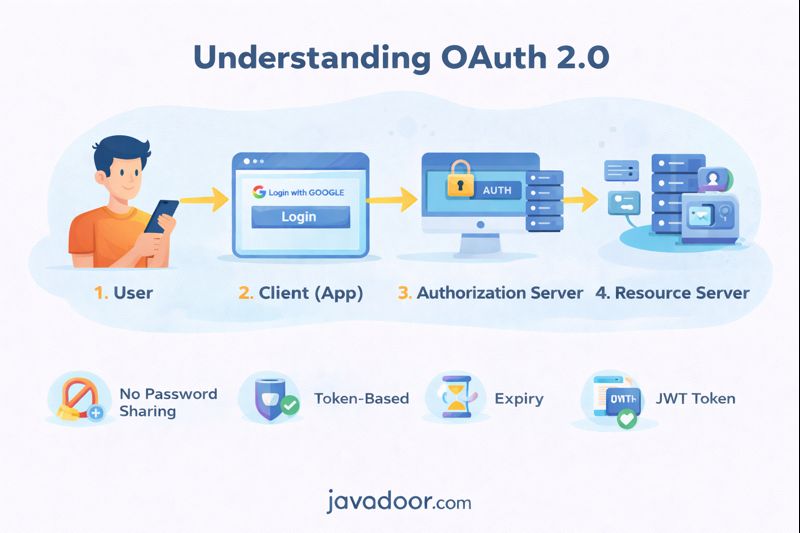
From Page 1 diagram:
| Role | Meaning |
|---|---|
| Resource Owner | User (you) |
| Client | App (Instagram) |
| Authorization Server | Google Auth Server |
| Resource Server | Google APIs |
OAuth Grant Types
OAuth provides different flows based on use-case:
| Grant Type | Use Case |
|---|---|
| Authorization Code | Web apps (most secure) |
| Implicit | Old SPAs (not recommended now) |
| Password Grant | Trusted internal apps |
| Client Credentials | Machine-to-machine |
| Refresh Token | Renew access token |
Authorization Code Grant (Most Important)
This is the industry standard flow.
Used by:
- GitHub
Step-by-Step Flow (Page 1 Diagram)
1. User clicks “Login with Google”
Client redirects user to:
/authorize
2. User authenticates on Google
Google shows login page.
3. User gives consent
Allows Instagram to access email/profile.
4. Google sends Authorization Code
Redirects back:
https://myapp.com/callback?code=xyz
5. Client exchanges code for token
Client calls:
POST /token
6. Receives:
{
  "access_token": "...",
  "refresh_token": "...",
  "expires_in": 3600
}
7. Client accesses protected APIs
Using:
Authorization: Bearer <access_token>
Registration Process
Before using OAuth, client must register.
Request:
POST /register
{
  "client_name": "myapp",
  "redirect_uri": "https://myapp.com/callback"
}
Response:
{
  "client_id": "abc123",
  "client_secret": "secret"
}
This is used for client authentication.
Fetch Authorization Code
Request:
GET /authorize?
response_type=code
&client_id=abc123
&redirect_uri=https://myapp.com/callback
&scope=profile email
&state=xyz
Response:
https://myapp.com/callback?code=AUTH_CODE
Important Parameters
| Param | Purpose |
|---|---|
| response_type | Must be code |
| client_id | App identity |
| redirect_uri | Callback |
| scope | Permissions |
| state | Prevent CSRF |
Fetch Access Token
Request:
POST /token
grant_type=authorization_code
&code=AUTH_CODE
&client_id=abc123
&client_secret=secret
Response:
{
 "access_token": "abc",
 "refresh_token": "xyz",
 "expires_in": 3600
}
Refresh Token Flow
When access token expires:
Request:
POST /token
grant_type=refresh_token
&refresh_token=xyz
Response:
New access token returned.
Implicit Grant (Deprecated)
Used in old SPAs.
Token returned directly in URL:
/callback#access_token=abc
No refresh token.
Highly insecure. Avoid.
Password Grant (ROPC)
User gives username/password directly to client.
Request:
GET /token
grant_type=password
&username=nimai
&password=123
Used only in:
- Internal trusted apps
Client Credentials Grant
Used for:
- Microservices
- Server-to-server calls
No user involved.
Request:
GET /token
grant_type=client_credentials
No refresh token.
OAuth vs JWT
| OAuth | JWT |
|---|---|
| Authorization framework | Token format |
| Defines flows | Defines structure |
| Issues tokens | Is the token |
OAuth often uses JWT as access token.
Real-World Example
When you click:
Login with Google
You are using:
- OAuth 2.0
- Authorization Code Grant
- JWT Access Token
Interview Questions & Answers
Q1. OAuth is authentication or authorization?
Authorization.
Q2. What is scope?
Defines what client can access.
Q3. Why state parameter?
Prevents CSRF attacks.
Q4. Why authorization code is short-lived?
Prevents replay attacks.
Q5. Which grant is most secure?
Authorization Code Grant.
Q6. Which grant is used in microservices?
Client Credentials.
Final Summary for javaddor.com
OAuth 2.0 is:
✔ Industry standard
✔ Used by Google, Facebook, GitHub
✔ Secure token-based access
✔ No password sharing
✔ Works with JWT
It is mandatory knowledge for:
- Spring Security
- Microservices
- API Gateways
- SSO Systems
OAuth controls WHO can access WHAT
JWT controls HOW access is verified
Together, they form the backbone of modern security architecture.