
Form Login Authentication in Spring Security – A Complete Guide
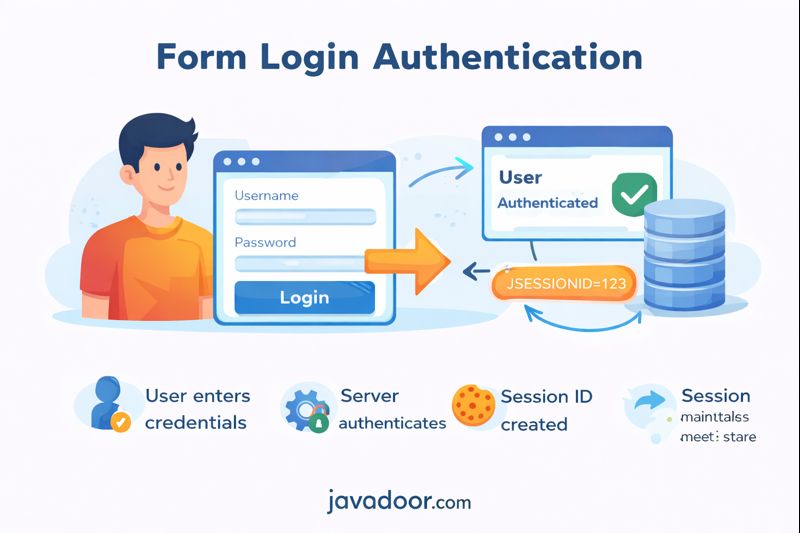
Form Login Authentication is the default authentication mechanism in Spring Boot Security. It is simple, powerful, and widely used in traditional web applications.
But to use it properly, we must understand how it actually works internally.
What is Form Login Authentication?
Form login is a stateful authentication mechanism.
What does Stateful mean?
Stateful means:
The server maintains user authentication state using an HTTP Session.
Once the user is authenticated, they don’t need to send username/password with every request.
Instead, the browser sends only:
JSESSIONID
Which represents the user session.
High-Level Flow
- User submits login form with username/password.
- Spring Security validates credentials.
- Server creates an HTTP Session.
- Server returns:
Set-Cookie: JSESSIONID=123
- Browser stores the cookie.
- For every next request:
Cookie: JSESSIONID=123
- Server validates the session and authorizes the user.
Default URLs in Spring Security
| Purpose | URL |
|---|---|
| Login | /login |
| Logout | /logout |
These come out-of-the-box with Spring Boot Security.
Internal Architecture (Simplified)
When /login is called, this chain executes:
SecurityFilterChain
   ↓
UsernamePasswordAuthenticationFilter
   ↓
AuthenticationManager
   ↓
ProviderManager
   ↓
DaoAuthenticationProvider
   ↓
UserDetailsService
   ↓
PasswordEncoder
What Happens During First Login?
At this point:
- No session exists.
- Only user exists.
Spring performs:
- Hash incoming password.
- Load user from:
- InMemory
- DB
- LDAP
- Compare hashed passwords.
- Create Authentication object.
- Store in SecurityContext.
- Store SecurityContext inside HttpSession.
Default User Creation (Out of the Box)
When you add this dependency:
<dependency>
  <groupId>org.springframework.boot</groupId>
  <artifactId>spring-boot-starter-security</artifactId>
</dependency>
Spring automatically creates:
username: user
password: randomly generated
Printed in logs at startup.
Every restart → new password.
This is controlled by:
- SecurityProperties
- UserDetailsServiceAutoConfiguration
- InMemoryUserDetailsManager
Ways to Control User Creation
1. application.properties (Dev Only)
spring.security.user.name=nimai
spring.security.user.password=12345
Not recommended for production.
2. Custom InMemoryUserDetailsManager (Dev Only)
@Bean
public InMemoryUserDetailsManager userDetailsService() {
   UserDetails user = User.withUsername("nimai")
        .password("{noop}12345")
        .roles("USER")
        .build();
   return new InMemoryUserDetailsManager(user);
}
Why {noop}?
Spring uses DelegatingPasswordEncoder.
Stored password format:
{id}encodedPassword
Examples:
{noop}12345{bcrypt}$2a$10$xyz
Spring checks {id} and routes to correct encoder.
PasswordEncoder Flow
DelegatingPasswordEncoder
   ↓
Detect {bcrypt}
   ↓
BCryptPasswordEncoder
   ↓
Hash incoming password
   ↓
Compare
Recommended: Store Users in Database
Production approach:
- Store users in DB
- Hash password using bcrypt
- Implement UserDetailsService
Entity
public class UserAuthEntity implements UserDetails {
   private String username;
   private String password;
   private String role;
}
Service
public class UserAuthService implements UserDetailsService {
   public UserDetails loadUserByUsername(String username) {
      return repo.findByUsername(username);
   }
}
Allow Register API Without Login
By default:
Every endpoint is authenticated.
So /auth/register must be allowed:
http
 .authorizeHttpRequests()
 .requestMatchers("/auth/register").permitAll()
 .anyRequest().authenticated();
Industry standard practice.
Session Lifecycle
| Step | Action |
|---|---|
| Login | Session created |
| Idle | Session expires |
| Request | Session refreshed |
| Invalid | Redirect to login |
Default TTL: 30 minutes
Configurable via:
server.servlet.session.timeout=1m
Store Sessions in Database (Distributed Systems)
Add dependency:
spring-session-jdbc
Spring creates:
SPRING_SESSION table
Now sessions are:
- Shared across servers
- Persisted
- Scalable
Authorization Flow
Authentication ≠ Authorization
After authentication:
AuthorizationFilter
   ↓
Check required role
   ↓
Compare with SecurityContext
Example:
.authorizeHttpRequests()
 .requestMatchers("/users").hasRole("USER")
Spring internally checks:
ROLE_USER
Session Creation Policies
| Policy | Meaning |
|---|---|
| IF_REQUIRED | Create only when needed (default) |
| ALWAYS | Always create session |
| NEVER | Never create, but use if exists |
| STATELESS | No session at all (JWT) |
Limit Sessions Per User
sessionManagement()
 .maximumSessions(1)
 .maxSessionsPreventsLogin(true);
Prevents:
- Same user login in multiple browsers.
Disadvantages of Form Login
1. CSRF Risk
Because cookies are auto-attached.
Spring enables CSRF by default (don’t disable).
2. Session Hijacking
If attacker steals:
JSESSIONID
They become you.
3. Scalability Issues
Distributed systems require:
- DB session store
- Redis
- Cache
Which increases:
- Latency
- Memory
- Cost
4. Not Suitable for APIs
Mobile & microservices prefer:
- JWT
- OAuth2
- Stateless auth
When Should You Use Form Login?
| Use Case | Suitable? |
|---|---|
| Admin panels | Yes |
| Banking portals | Yes |
| Microservices | No |
| Mobile apps | No |
| REST APIs | No |
Interview Questions & Answers
Q1. Why form login is stateful?
Because authentication state is stored on server using HTTP session.
Q2. Where is Authentication object stored?
Inside:
HttpSession → SecurityContext → Authentication
Q3. Why JWT is more scalable than sessions?
Because JWT:
- No server memory
- No DB lookup
- Stateless
Q4. What happens if session expires?
User must re-authenticate.
Q5. Why CSRF is enabled by default?
Because form login uses cookies → vulnerable.
Q6. Difference between Authentication & Authorization?
| Authentication | Authorization |
|---|---|
| Who are you? | What can you access? |
| Login | Permission |
| Username/Password | Roles |
Final Thoughts
Form Login Authentication is:
- Simple
- Powerful
- Secure (if used correctly)
But it is not designed for modern distributed systems.
Use it for:
- Traditional web apps
- Admin dashboards
- Server-rendered UIs
Avoid it for:
- Mobile apps
- Microservices
- Public APIs
Form login is perfect for human users,
JWT is perfect for machine-to-machine systems.
Understanding this difference is the key to mastering Spring Security.