
Synchronous Communication Between Microservices in Spring Boot
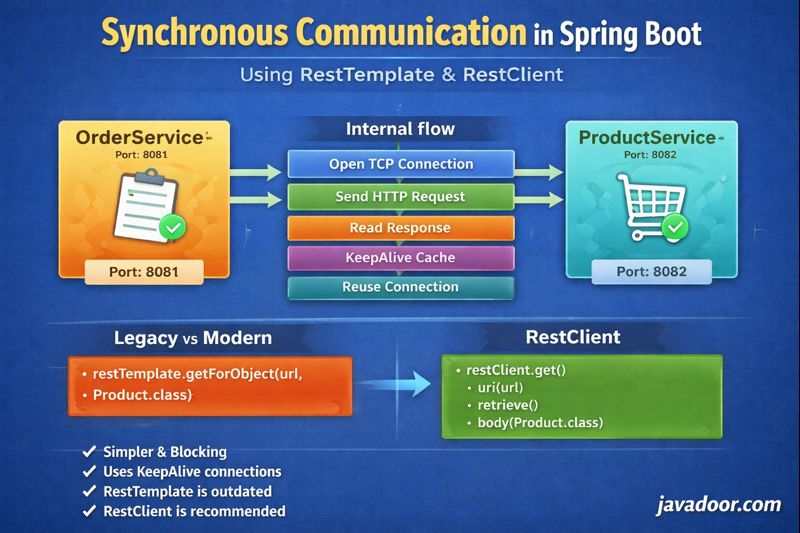
(OrderService ↔ ProductService using RestTemplate & RestClient)
In a real-world microservices architecture, services rarely live in isolation. They constantly need to talk to each other.
In this blog, we will cover:
- Setting up two microservices
- How they communicate
- Deep dive into Synchronous communication
- Internals of RestTemplate
- Its limitations
- Why RestClient is the modern replacement
1. Microservices Setup
We will create two independent Spring Boot applications:
| Service | Port |
|---|---|
| OrderService | 8081 |
| ProductService | 8082 |
Both are created using Spring Initializr.

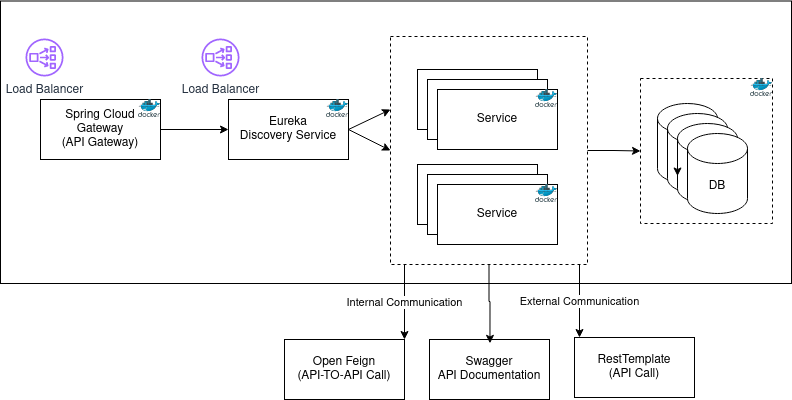
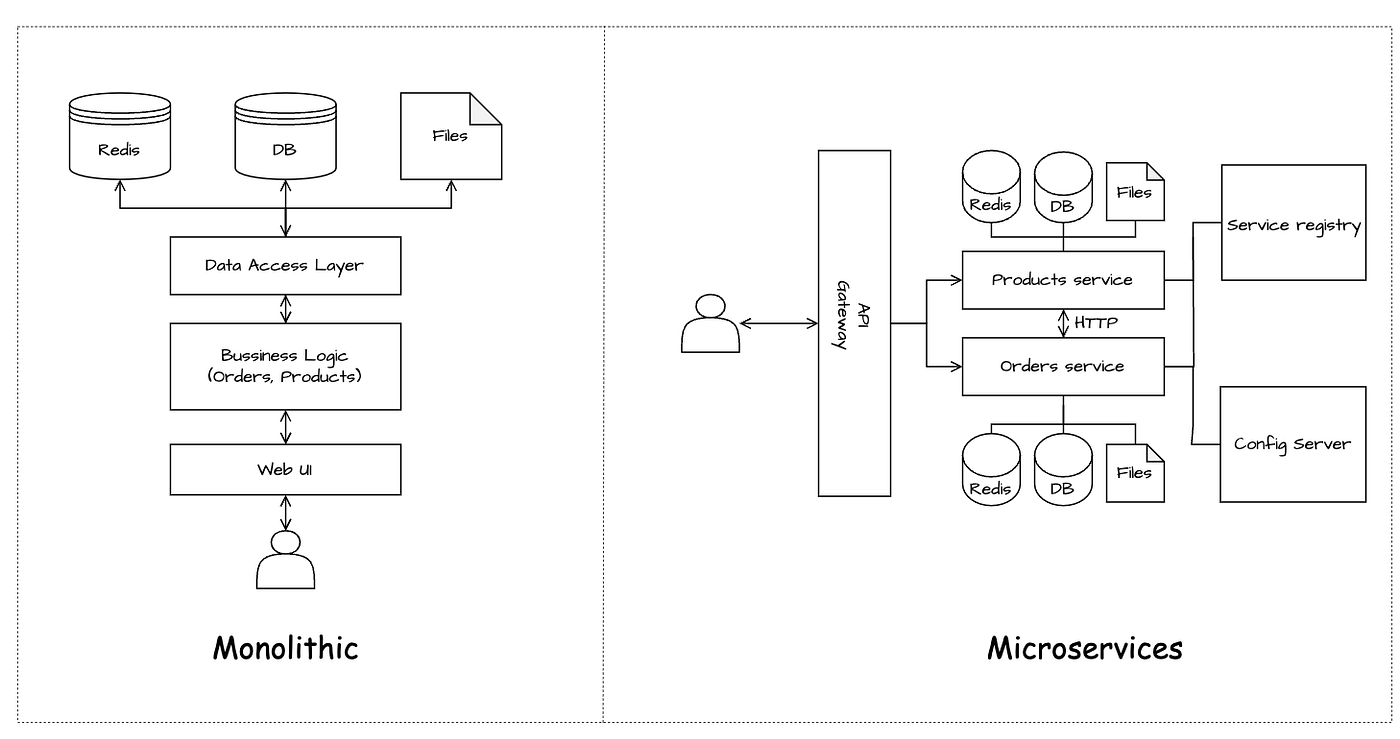
2. Types of Communication Between Microservices
There are two main ways:
1. Synchronous
- Client waits for response
- Blocking in nature
- Example: HTTP REST calls
2. Asynchronous
- Client does not wait
- Non-blocking
- Example: Kafka, RabbitMQ
In this blog, we focus on Synchronous Communication.
3. What is Synchronous Communication?
Client sends request and waits until server responds.
Characteristics:
- Blocking
- Thread remains busy
- Simple to implement
- Easy to debug
4. Synchronous Communication Options in Spring Boot
Spring provides multiple clients:
| Client | Status |
|---|---|
| RestTemplate | Legacy |
| RestClient | Modern |
| FeignClient | Declarative |
We start with RestTemplate.
5. Basic Example: OrderService → ProductService
String response = restTemplate.getForObject(
    "http://localhost:8082/products/" + id,
    String.class
);
OrderService calls ProductService synchronously.
6. What Happens Internally in RestTemplate?
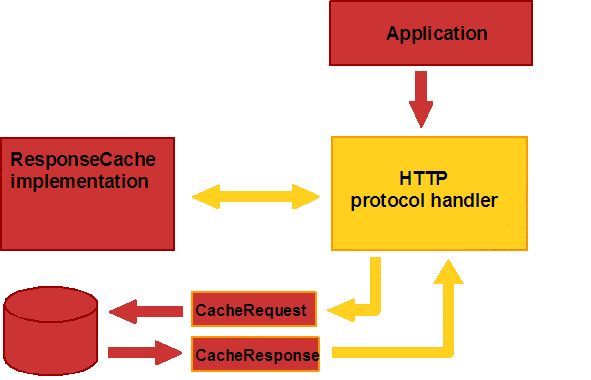

Internally:
- Creates
HttpURLConnection - Opens TCP connection
- Sends HTTP request
- Reads response
- Returns response
- Keeps TCP alive (if possible)
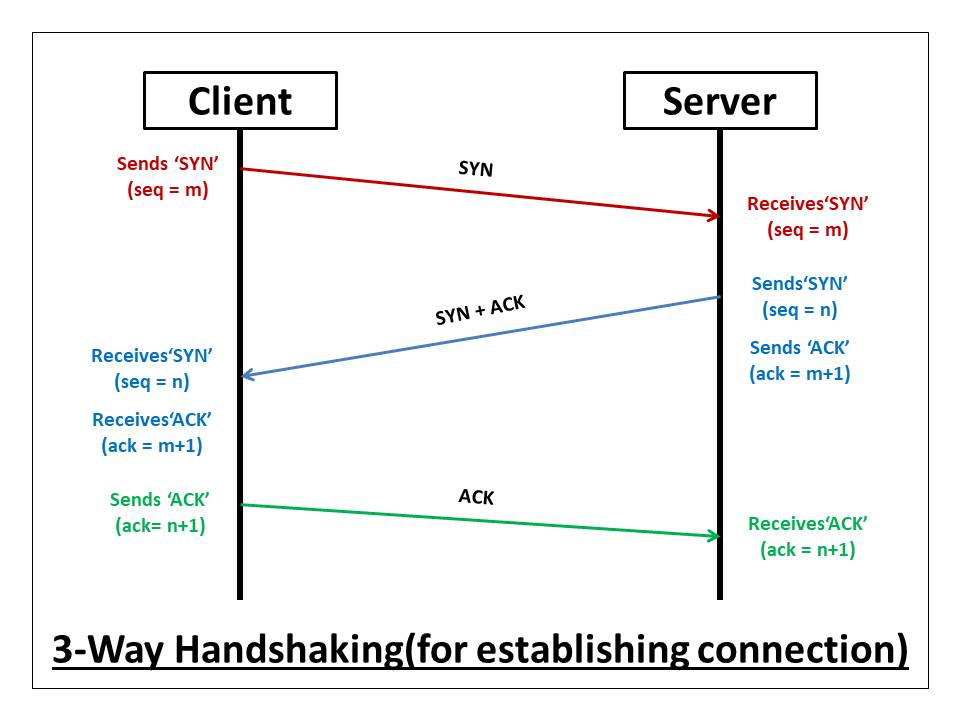
7. TCP Level Flow (3-Way Handshake)
Before HTTP:
Client → SYN
Server → SYN-ACK
Client → ACK
TCP connection established.
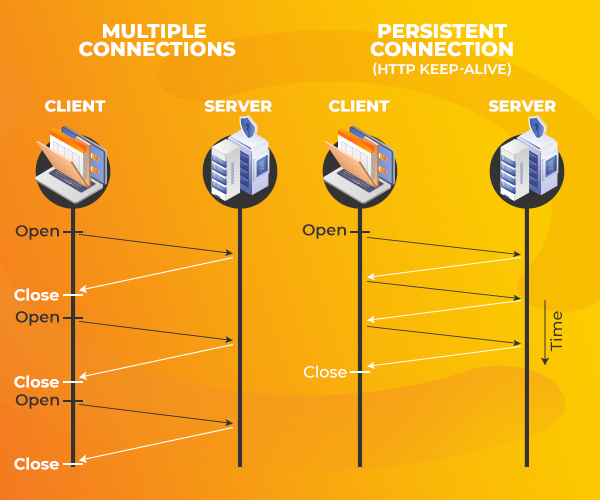
8. HTTP Keep-Alive Explained
Default in HTTP/1.1:
Connection: keep-alive
Keep-Alive: timeout=5, max=50
Means:
- Reuse same TCP connection
- Close if idle for 5 seconds
- Max 50 requests per connection
Better performance than reconnecting every time.
9. What is KeepAliveCache?
Java maintains a cache:
Key   → host:port
Value → HttpClient (TCP connection)
If response stream is fully read, connection is reused.
Else → connection is closed.
10. Why Plain Java HTTP is Painful?
Using HttpURLConnection manually:
- Open connection
- Set headers
- Serialize JSON
- Read streams
- Close resources
Too much boilerplate.
11. Why RestTemplate Became Popular?
Because it:
- Hides TCP complexity
- Auto JSON mapping
- Simple method calls
12. Common RestTemplate Methods
GET
Product p = restTemplate.getForObject(url, Product.class);
ResponseEntity<Product> res = restTemplate.getForEntity(url, Product.class);
POST
Product created = restTemplate.postForObject(url, product, Product.class);
PUT
restTemplate.put(url, updatedProduct);
DELETE
restTemplate.delete(url);
Exchange (Most Powerful)
HttpHeaders headers = new HttpHeaders();
headers.setContentType(MediaType.APPLICATION_JSON);

HttpEntity<Product> entity = new HttpEntity<>(product, headers);

ResponseEntity<Product> response = restTemplate.exchange(
    url,
    HttpMethod.POST,
    entity,
    Product.class
);
Execute (Full Control – Like Plain Java)
String response = restTemplate.execute(
    url,
    HttpMethod.POST,
    requestCallback,
    responseExtractor
);
You manually control:
- Headers
- Body
- Serialization
- Deserialization
13. Internals of RestTemplate Flow
RestTemplate
  ↓
ClientHttpRequestFactory
  ↓
SimpleClientHttpRequest
  ↓
HttpURLConnection
  ↓
KeepAliveCache
  ↓
TCP Socket
Important:
RestTemplate never closes TCP directly
It only closes response stream.
14. Limitations of RestTemplate
1. Too Many Methods
Hard to remember overloads.
2. No Modern Features
No built-in:
- Retry
- Circuit breaker
- Rate limiting
3. Maintenance Mode
Spring officially says:
No new features, only bug fixes.
15. Enter: RestClient (Modern Way)
Spring introduced RestClient as replacement.
Advantages:
- Fluent API
- Builder style
- Easier interceptors
- Cleaner code
- Future-proof
16. RestClient Example
RestClient client = RestClient.create();

Product product = client.get()
    .uri("http://localhost:8082/products/1")
    .retrieve()
    .body(Product.class);
Readable, minimal, powerful.
17. Why RestClient is Better
| Feature | RestTemplate | RestClient |
|---|---|---|
| API style | Verbose | Fluent |
| Extensible | Hard | Easy |
| Retry support | No | Yes |
| Circuit breaker | No | Yes |
| Future support | No | Yes |
18. Interview Questions & Answers
Q1. What is synchronous communication?
Answer:
Client waits for server response before proceeding.
Q2. What is RestTemplate?
Answer:
A blocking HTTP client to call REST APIs in Spring.
Q3. What happens internally in RestTemplate?
Answer:
It creates HttpURLConnection, opens TCP socket, sends request, reads response, and reuses connection via KeepAliveCache.
Q4. What is KeepAlive?
Answer:
Reuse same TCP connection for multiple HTTP requests.
Q5. Why RestTemplate is deprecated?
Answer:
Not extensible, not modern, hard to add retry/circuit breaker.
Q6. What is RestClient?
Answer:
Modern, fluent HTTP client introduced by Spring as replacement.
Q7. Difference between RestTemplate and RestClient?
| RestTemplate | RestClient |
|---|---|
| Old | New |
| Blocking | Blocking but modern |
| Maintenance | Active development |
| Hard config | Easy config |
Final Thoughts
In microservices:
- Communication is inevitable
- Synchronous is simplest
- But tool choice matters
Rule of Thumb:
- Learning / Legacy → RestTemplate
- Production / New systems → RestClient
- Large systems → Feign + Resilience4j
RestClient represents the future of synchronous communication in Spring Boot.