
Basic Authentication in Spring Security – Complete Guide
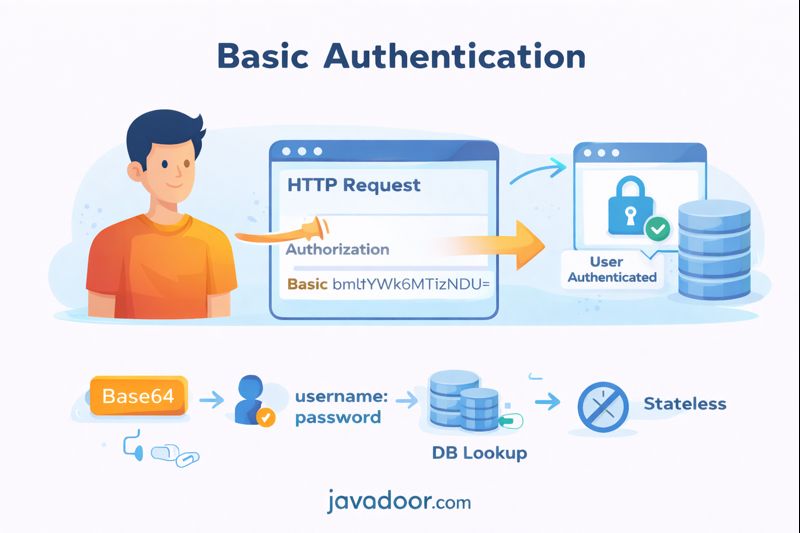
Basic Authentication is one of the simplest authentication mechanisms supported by Spring Security. It is easy to implement, widely supported, and based on HTTP standards.
However, it comes with serious limitations and is rarely used in large production systems.
This article covers:
- What Basic Authentication is
- How it works internally
- Why credentials are sent in headers
- Spring Security flow
- Real disadvantages and best practices
What is Basic Authentication?
Basic Authentication is a stateless authentication method.
What does stateless mean?
Stateless means:
The server does NOT store any authentication state (no session).
For every single request, the client must send:
username and password
Using HTTP Header:
Authorization: Basic base64(username:password)
Important: Base64 is NOT encryption
Base64 is only encoding, not encryption.
Example:
nimai:12345
Encoded:
bmltYWk6MTIzNDU=
Anyone can decode it easily.
That’s why Basic Auth must always be used with HTTPS.
High-Level Flow
- Client sends request:
Authorization: Basic bmltYWk6MTIzNDU=
- Spring decodes header.
- Extracts username/password.
- Hashes incoming password.
- Fetches user from DB.
- Compares passwords.
- Creates Authentication object.
- Allows request.
No session is created.
Why Use Authorization Header?
A common question:
Why not send credentials in request body?
Reason 1: HTTP Standard (RFC 7617)
Basic Auth is defined by HTTP spec:
Authorization: Basic <credentials>
This ensures:
- Universal compatibility
- Works across browsers, tools, APIs
Reason 2: Security
Servers often log:
- Request body
- Query params
But headers are rarely logged.
So credentials in headers reduce exposure.
Reason 3: Works for All HTTP Methods
GET requests:
- Do not support request body.
But headers work for:
- GET
- POST
- PUT
- DELETE
So credentials can be sent consistently.
Internal Spring Security Flow
When a request arrives:
SecurityFilterChain
   ↓
BasicAuthenticationFilter
   ↓
AuthenticationManager
   ↓
ProviderManager
   ↓
DaoAuthenticationProvider
   ↓
UserDetailsService
   ↓
PasswordEncoder
What Happens Internally?
Step 1: Read Authorization Header
Authorization: Basic bmltYWk6MTIzNDU=
Step 2: Decode
Spring decodes:
nimai:12345
Step 3: Fetch User
From:
- InMemoryUserDetailsManager
- JdbcUserDetailsManager
- Custom DB implementation
Step 4: Password Comparison
Incoming password is:
- Hashed using BCrypt
- Compared with stored hash
Step 5: Create Authentication Object
Before:
authenticated = false
After:
authenticated = true
Stored in:
SecurityContextHolder
Key Difference from Form Login
| Feature | Form Login | Basic Auth |
|---|---|---|
| Session | Yes | No |
| Stateless | No | Yes |
| Credentials sent | Once | Every request |
| CSRF | Required | Not required |
| Browser friendly | Yes | No |
| API friendly | No | Yes |
How to Enable Basic Authentication
pom.xml
spring-boot-starter-security
application.properties
spring.security.user.name=nimai
spring.security.user.password=12345
SecurityConfig
http
  .csrf().disable()
  .authorizeHttpRequests()
  .anyRequest().authenticated()
  .and()
  .httpBasic();
Why CSRF is Disabled?
Because:
- No cookies
- No session
- No automatic browser behavior
CSRF depends on cookies → Basic Auth doesn’t use them.
Real Disadvantages of Basic Authentication
1. Credentials Sent Every Time
Every request contains:
username:password
Which means:
- Larger request size
- Repeated exposure
- Higher risk
2. Very Dangerous Without HTTPS
If someone captures:
Authorization: Basic bmltYWk6MTIzNDU=
They decode and get full access.
3. No Logout Mechanism
There is no session to destroy.
Only way to logout:
- Close browser
- Or change password
4. Not Scalable
Every request does:
- Base64 decoding
- Password hashing
- DB lookup
Which causes:
- High CPU usage
- High DB load
- Higher latency
5. No Token Revocation
If credentials leaked:
- All requests compromised
- Only solution: change password
No fine-grained control.
When Should You Use Basic Auth?
| Use Case | Recommended |
|---|---|
| Internal tools | Yes |
| Dev environments | Yes |
| Testing APIs | Yes |
| Microservices | No |
| Mobile apps | No |
| Public APIs | No |
Basic Auth vs JWT
| Feature | Basic | JWT |
|---|---|---|
| Stateless | Yes | Yes |
| Credential exposure | High | Low |
| Token expiry | No | Yes |
| Revocation | No | Yes |
| DB lookup | Every request | Optional |
| Modern standard | No | Yes |
Interview Questions & Answers
Q1. Why is Basic Authentication stateless?
Because server does not store session or user state.
Q2. Is Base64 secure?
No. It’s reversible encoding.
Q3. Why CSRF not required?
Because no cookies and no sessions.
Q4. Can we logout in Basic Auth?
No. Only by closing browser or changing password.
Q5. Why Basic Auth is not used in production?
Because:
- High credential exposure
- No revocation
- No expiry
- Poor scalability
Final Thoughts
Basic Authentication is:
- Easy
- Standard
- Stateless
But also:
- Insecure without HTTPS
- Not scalable
- No logout
- No token control
It is perfect for:
- Internal systems
- Dev environments
- Quick testing
But for real systems, always prefer:
JWT / OAuth2 / Token-based Authentication
Basic Auth teaches fundamentals,
but JWT solves real-world problems.