
Spring Boot – ResponseEntity & HTTP Response Codes
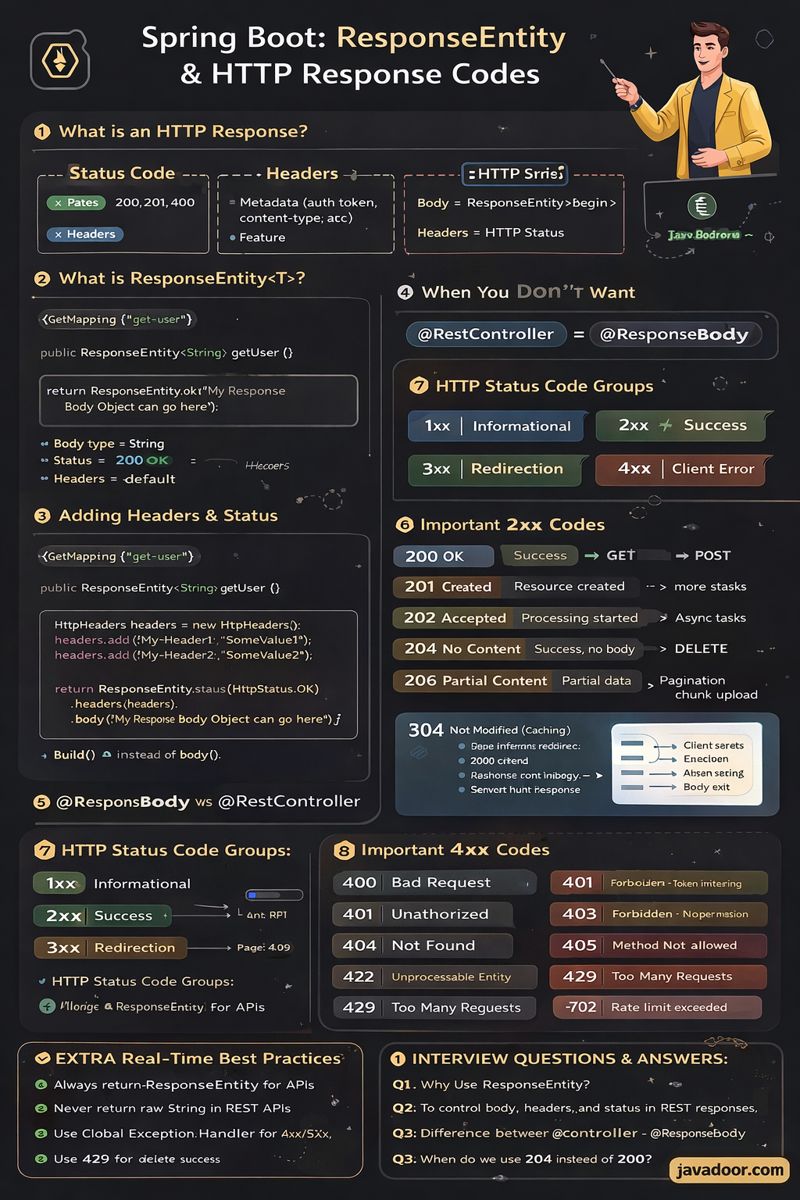
(Deep Notes + Extra Concepts + Interview Q&A)
1. What is an HTTP Response?
According to page 1, every HTTP response has 3 parts:
| Part | Description |
|---|---|
| Status Code | 200, 201, 400, 500 etc |
| Headers | Metadata (auth token, content type, cache info, etc.) |
| Body | Actual data returned to client |
2. What is ResponseEntity<T>?
ResponseEntity<T> is a Spring wrapper to send:
- Body
- Headers
- HTTP Status
@GetMapping("/get-user")
public ResponseEntity<String> getUser() {
    return ResponseEntity.ok("My Response Body Object can go here");
}
Here:
String= body type- Status = 200 OK
- Headers = default
3. Adding Headers & Status
From page 1, example:
@GetMapping("/get-user")
public ResponseEntity<String> getUser() {

    HttpHeaders headers = new HttpHeaders();
    headers.add("My-Header1", "SomeValue1");
    headers.add("My-Header2", "SomeValue2");

    return ResponseEntity.status(HttpStatus.OK)
                         .headers(headers)
                         .body("My Response Body Object can go here");
}
🔹 Builder Pattern
status(), headers(), body() all return builders, not the object.
Final object is created only when .body() or .build() is called.
4. When You Don’t Want Body
From page 1:
@GetMapping("/get-user")
public ResponseEntity<Void> getUser() {

    HttpHeaders headers = new HttpHeaders();
    headers.add("My-Header1", "SomeValue1");
    headers.add("My-Header2", "SomeValue2");

    return ResponseEntity.status(HttpStatus.OK)
                         .headers(headers)
                         .build();
}
Use build() instead of body().
5. @ResponseBody vs @RestController
From page 2:
Why @ResponseBody?
When returning String / POJO, Spring by default treats it as a View Name.
@ResponseBody tells Spring:
“Treat this return as response body, not as a view.”
Why it works without @ResponseBody in RestController?
Because:
@RestController = @Controller + @ResponseBody
So all methods automatically return JSON/text.
6. If You Use @Controller Instead of @RestController
From page 2:
@Controller
public class UserController {

    @GetMapping("/get-user")
    public String getUser() {
        return "XYZ";
    }
}
Spring will try to find a view file named XYZ.html
Since it doesn’t exist → ❌ error.
7. HTTP Status Code Groups (Page 3)
| Group | Meaning |
|---|---|
| 1xx | Informational |
| 2xx | Success |
| 3xx | Redirection |
| 4xx | Client Error |
| 5xx | Server Error |
8. Important 2xx Codes
| Code | Meaning | Use |
|---|---|---|
| 200 OK | Success | GET, POST |
| 201 Created | Resource created | POST |
| 202 Accepted | Processing started | Async tasks |
| 204 No Content | Success, no body | DELETE |
| 206 Partial Content | Partial data | Pagination, chunk upload |
9. Important 3xx Codes
| Code | Meaning |
|---|---|
| 301 | Permanent redirect |
| 308 | Permanent redirect, same method |
| 304 | Not Modified (Caching) |
304 Flow (page 3):
- Client sends
If-Modified-Since - Server checks resource
- If unchanged → return 304
10. Important 4xx Codes
| Code | Meaning | When |
|---|---|---|
| 400 | Bad Request | Missing fields |
| 401 | Unauthorized | Token missing |
| 403 | Forbidden | No permission |
| 404 | Not Found | ID not exists |
| 405 | Method Not Allowed | Wrong HTTP method |
| 422 | Unprocessable Entity | Business validation |
| 429 | Too Many Requests | Rate limit exceeded |
11. Important 5xx Codes
| Code | Meaning |
|---|---|
| 500 | Internal Server Error |
| 501 | Not Implemented |
| 502 | Bad Gateway (Reverse Proxy error) |
Example (page 4):
If Nginx cannot talk to backend → return 502
12. 100 Continue (Page 4)
Used when sending large data.
Flow:
- Client sends headers with
Expect: 100-continue - Server validates
- If OK → sends
100 Continue - Client sends body
EXTRA REAL-TIME BEST PRACTICES
- Always return ResponseEntity for APIs
- Never return raw String in REST APIs
- Use Global Exception Handler for 4xx/5xx
- Use 429 for rate limiting
- Use 204 for delete success
- Use 201 for create APIs
INTERVIEW QUESTIONS & ANSWERS
Q1. Why use ResponseEntity?
Ans: To control body, headers, and status in REST responses.
Q2. Difference between @Controller and @RestController?
Ans:
@RestController = @Controller + @ResponseBody
Q3. When do we use 204 instead of 200?
Ans: When success but no response body is required.
Q4. When to use 422?
Ans: Business validation failure (not syntax error).
Q5. Difference between 401 and 403?
| 401 | Not authenticated |
| 403 | Authenticated but no permission |
Q6. What is 429?
Ans: When API is hit more than allowed rate.
Q7. What happens if we return String from @Controller?
Ans: Spring treats it as View name.
Q8. Why is 304 important?
Ans: It saves bandwidth by using cached data.